10×20 · Focused Displays & Reception
Combine rear graphics, a compact product or software demonstration and a small conversation area. Confirm display depth, screen needs and visitor access from each open side.
Explore 10×20 Rental & Design →
PORTFOLIO · THREE OPEN SIDES
A peninsula trade show booth rental typically has three aisle-facing open sides and one rear or adjoining boundary. Exhibitsmax plans rental structures, graphics, product displays and meeting areas around those approaches, using the rear structure where appropriate for branding and storage. The real projects below provide references for compact technical displays and demonstrations; the final configuration always follows your assigned floor plan. Compare rental directions without assuming that a particular size guarantees peninsula status. Rear-wall placement, exposed surfaces, sightlines and permitted structural elements are checked against the current show requirements before approval.
Explore Peninsula Booth Projects ↓Request a Booth Rental & Design QuoteChoose a footprint around your displays, demonstrations and meetings. We can develop rental or hybrid layouts for the sizes below, subject to component availability and your assigned three-aisle configuration. Size alone does not make a booth a peninsula.
Combine rear graphics, a compact product or software demonstration and a small conversation area. Confirm display depth, screen needs and visitor access from each open side.
Explore 10×20 Rental & Design →Use a square footprint to separate reception, product browsing and seated discussions. Confirm product dimensions, furniture quantities and rear-boundary placement before selecting components.
Compare 20×20 Booth Options →Connect several demonstration stations with a meeting zone and integrated storage. Review queue space, staff routes, power and screen positions together.
Plan a 20×30 Rental Layout →Separate full-size products, demonstrations and buyer meetings while preserving routes from three aisles. Share equipment dimensions, weights, handling needs and the assigned floor plan.
Explore 30×30 Booth Planning →The linked size pages include different booth configurations and general design references. Their projects are not all peninsula exhibits or fixed rental packages. Final structures, graphics, AV, freight and installation scope are itemized in your proposal.
Explore six 10×20 peninsula projects through their renderings and completed booth photographs. Each case study records its own design and service scope; a reference layout does not mean every component was rented or is available as a fixed package.
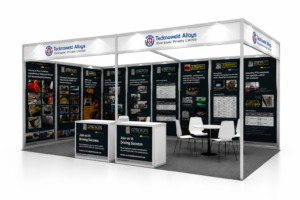
Tecknoweld’s 10×20 layout combines technical product panels with front welcome counters and an open meeting area. The graphic surfaces organize wear-protection products and applications, giving the team a reference for more detailed discussions. This modular peninsula exhibit balances industrial information, visitor contact points and seated conversations within a compact footprint.
View Case Study →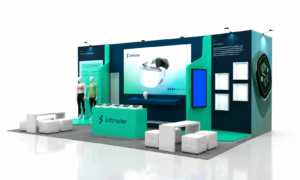
Softmatter’s 10×20 CES exhibit uses dark blue brand walls, green accents and illuminated features to frame wearable-technology and smart-material presentations. Digital screens and product displays create several interaction points within the footprint. The project offers a reference for coordinating technical demonstrations, graphic messaging and visitor access around a compact technology display.
View Case Study →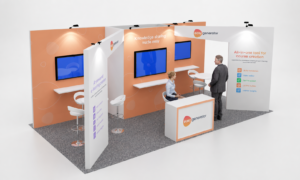
Easygenerator’s 10×20 DevLearn exhibit combines orange graphic walls, white partitions and wall-mounted monitors for software demonstrations. Slim shelves and stools support focused conversations, while a branded reception counter establishes an arrival point. Openings between the panels connect the stations, showing how several digital presentation areas can share 200 square feet.
View Case Study →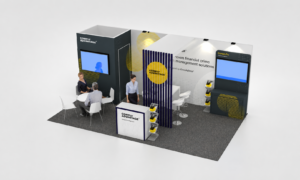
ComplyAdvantage’s 10×20 exhibit brings integrated monitors, a reception counter and a round meeting table into one footprint. A vertical slat feature separates presentation areas while keeping views through the structure. Dark walls, white graphics and yellow branding connect the stations, offering a compact reference for software demonstrations and seated business conversations.
View Case Study →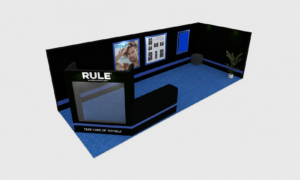
RULE’s 10×20 Cosmoprof exhibit combines black-and-blue branding, illuminated product areas and built-in shelving. A front display counter presents the collection, while lounge-style seating supports buyer conversations. Product cabinetry and graphics concentrate the presentation around the structure, leaving usable space for visitors to approach, browse and discuss the cosmetics and personal-care range.
View Case Study →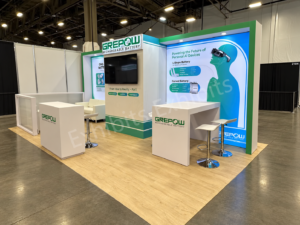
GREPOW’s 10×20 peninsula exhibit at CES 2026 combines a central monitor tower, battery-solution graphics and two conversation areas. A sofa and low table support seated discussions, while a high table and stools provide another meeting format. Branded counters and three aisle-facing sides connect the product information with visitor access.
View Case Study →Visitors can typically approach from three aisle-facing sides, creating several opportunities for entry and product visibility.
Unlike an island booth, a peninsula usually has one side adjoining another exhibit or defined as the rear boundary.
Plan branding, screens and product displays for sightlines from three directions rather than one primary frontage.
Coordinate the rear structure, storage, graphics and taller elements with the actual floor plan and current show rules.
Simplified top views. Navy lines show adjoining boundaries; orange dashed lines show open aisle sides. Exact construction, access and sightline requirements follow the event floor plan and exhibitor manual.
Start with the assigned rear boundary, then keep the other three sides useful for arrival and circulation. Place technical graphics and staff storage toward the rear, with product engagement and conversations connected by clear routes.
Tecknoweld combines technical information and meetings; Easygenerator organizes several software demonstration points; RULE combines product shelving with lounge seating. Their priorities differ even though all use a 10×20 footprint.
Choose the essential activities first, then check how visitors reach them from each aisle. Keep waiting visitors, seated guests and staff work areas out of the main entry paths.
Explore All 10×20 Booth Projects →Use the main rear structure for the logo, graphic hierarchy, screens and key messages. Keep it readable from the relevant aisle approaches.
Place counters and furniture so visitors can enter naturally from the main open sides. Allow room for staff and visitors to pause without blocking circulation.
Position products or demonstrations in a central or front area where several aisles can see them, with operating clearances appropriate to the display.
Place seating or meetings near the rear or in a quieter zone while keeping a direct route from the open sides.
Combine storage with the rear structure and keep staff access practical. Avoid turning an open aisle-facing elevation into an unintended back side.
A trade show booth design review can coordinate these functions. Use 3D visualization to check the three aisle views and the relationship between the rear structure, products and visitor routes.
Three open sides provide multiple approaches, while the rear structure can concentrate branding, screens and storage. Plan its relationship to any adjoining exhibit.
With aisles around the whole footprint, the design should address every elevation. Central structures and integrated storage need to work without creating an overlooked back side.
Use the assigned floor plan to choose the right reference. Browse island booth projects when the space has four-sided aisle exposure.
Tecknoweld’s MINExpo 2024 10×20 exhibit is classified as both a Peninsula Booth and a Modular Exhibit. Peninsula describes the floor-plan and open-side configuration; modular describes the structural system. The two labels can apply to the same project.
Modular Booth Rental & Design →Use this checklist to review the written proposal. The approved design and show requirements determine actual inclusions.
Review the front and side views, rear boundary, display zones and visitor circulation in the concept.
Specify rear structures, counters and storage components with appropriate dimensions and event-compliant placement.
Coordinate brand surfaces, product supports, lighting and selected screens with the viewing directions.
Check component fit, graphics, connections and packing against the approved design and agreed assembly scope.
Plan delivery, setup and dismantling around receiving windows, labor arrangements and the rear-structure build sequence.
Track approvals and responsibility for electrical, rigging or other services needed by the final design.
Show-site electrical, material handling (drayage), internet, rigging and exclusive contractor services may need separate orders and payment. Confirm who places each order and what remains outside the builder scope.
Peninsula booth rental cost depends on the footprint, rear structure, display and meeting needs, graphics, AV, freight and labor. Three open sides do not imply one standard price or package. A compact modular project and a larger peninsula with private meetings may require different structural work and service orders.
Compare design, component specifications, graphics, preparation, transport, installation, dismantling and project coordination line by line. Use our trade show booth cost and budget guides to separate builder scope from show-service expenses; request a project-specific proposal rather than relying on a universal square-foot price.
A peninsula trade show booth typically has three aisle-facing open sides and one rear side adjoining another exhibit or a defined boundary. The rear structure can organize branding, screens and storage while visitors approach from several directions. Confirm the configuration on the assigned event floor plan.
A peninsula normally has three open sides and one rear or adjoining side. An island normally has aisles on all four sides. Peninsula planning can use the rear structure as a primary branding and storage zone; island planning needs to address visibility and circulation around the whole exhibit.
Typically three sides face aisles. The actual access, neighboring exhibits and permitted construction depend on the event floor plan. Open sides describe aisle exposure; they do not remove the need to plan counters, displays, accessibility and clear visitor routes.
Start with the rear boundary, then plan clear access from all three open sides. Use the rear structure for key messaging and integrated storage, position products or demonstrations where several aisles can see them, and place meetings away from the busiest routes. Requirements vary by event and floor plan; confirm the current exhibitor manual before finalizing height, backwall, setback and sightline details.
Yes. Peninsula layouts can use rental structures, custom graphics, counters, displays and selected custom features. Verify the three open sides and rear boundary on the assigned floor plan, then confirm component availability and the current show requirements before approving the design.
A written proposal can include concept design, rental structures, graphics, display components, preparation, transport coordination, installation, dismantling and project management. Confirm selected AV, rear-wall treatment and custom features. Material handling, electrical, internet, rigging and exclusive venue services may be separate.
Share your show, city, booth size, assigned floor plan, open sides, products, demo and meeting needs, AV plans and target budget. We will develop a rental layout around three-side access and the actual rear boundary.
Request a Peninsula Booth Rental & Design Quote